


ShortForm Video Startup (2010 - 2014)
ShortForm was a video startup founded in 2010 that gave people the power to program their own video channels. Users could curate a channel of videos from places like YouTube and other video sites to share with the world.
The problem they were trying to solve: 500 hours of video are uplaoded to youtube every minute. You obviously don't have time to watch it all. ShortForm's goal was to let people decide what content should rise to the top and be viewable by everyone else. Users could become video jockeys for their own audience.
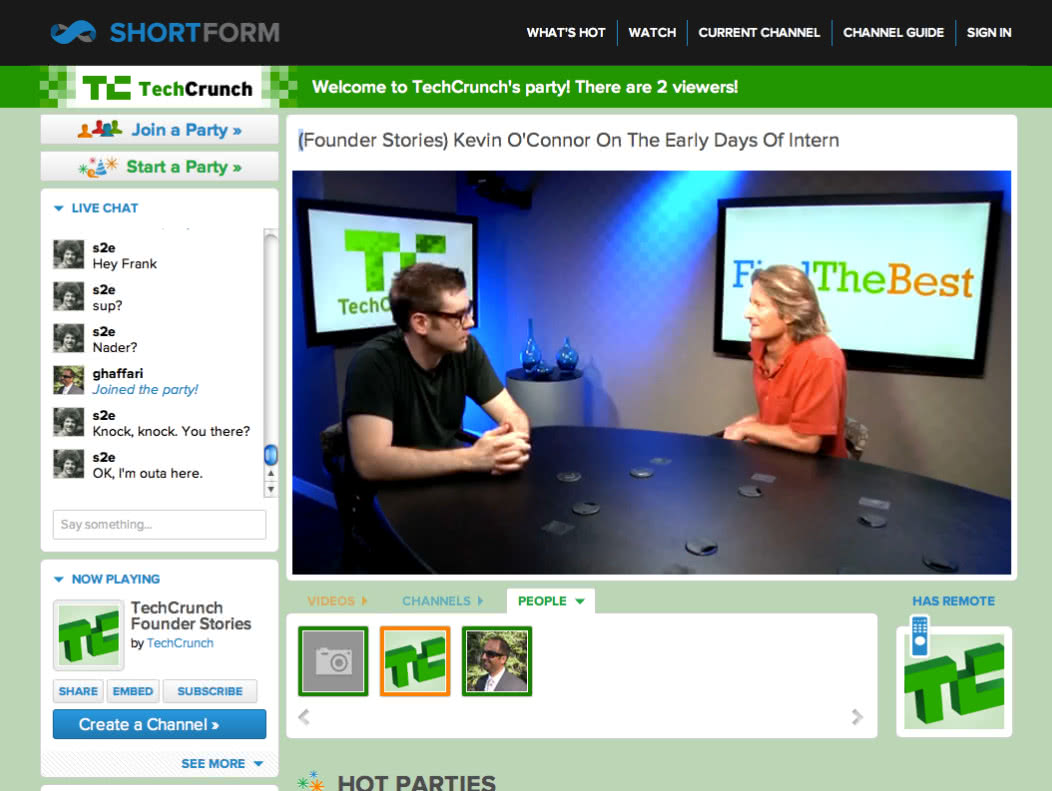
Eventually, ShortForm allowed VJs to play videos live to their audience in Video Parties. The audience could then chat with each other and the VJ.
In March, ShortForm hit one million visitors.
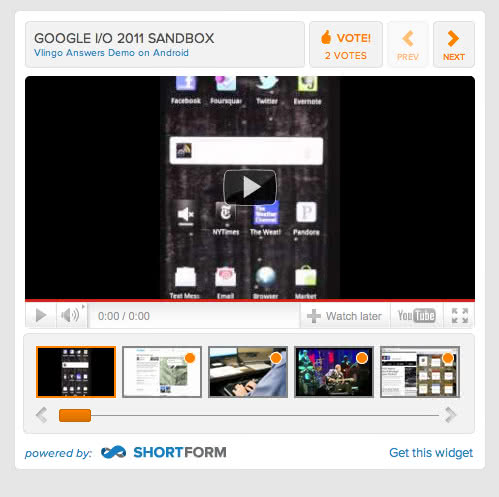
ShortForm was popular enough to get users like Google IO on their platform:
Popular VJs on ShortForm included:
| 0914721441 | 1marshmellow | 2011 | abetteryou | achance2laugh | acho1117 |
| adamsmith | Africanasoul | Aikatears | ajaimez | alberto | alexturnerftw |
| alixsz | amanda.stoneall | amberdawn | amenrib | AmericanKPopFans | andywhisney |
| ani27 | Apet90 | army_ants | attorneyonair | avilliotti | BarneyD |
| Benny.Domini | Bergified | beta_shen | Bklitz | bkno21427 | bkrichardson |
| blake.mccrossin | blog | BodybuildingTV | bookmarklet | BowserNoodles | brad.snedden |
| BradyB | BSnetlabel | buzz.short | calishutterbug | catymarie | celina.maria |
| cem.ucer | channels | chaseman210 | chocolatethunder | ChrisGopher | cindyYshaw |
| Codilicious | collegehumor | collegemusic | craig.short | cteagle1 | ctvproject |
| D.Sanch | Damir | dangr | daniel.gremke | daphne.tsou | david.ngo |
| Daybreak108 | Debonaire | djbeaz | djkim87 | dochannels | dong.liu |
| donnaetemadi | dopeysang | DudesBeingDudes | EgyptRising | El-Coo-Cooi | embed |
| enrique.tg | Equidia | ern3stoo | EvenHand | evillean | farmer |
| felicity.short | flippinfunny | forbes | FrankDaTank | freecannabis.ch | Freewheel |
| fridayin | FUBSZ | googleio | googleiosandbox | Gordana | GRM780 |
| gungodo | Gwenwai | hareen | hosaka | HousingDay | hulu |
| hybriDL | iChannel | idgab | IlanaLaVidaLoca | imarketsb | iocontest |
| IranRising | j | J-rod.J. | Jahtoya.Rodriquez | JamesJones22 | jason.kidster |
| jaypatel | jazzymae | jbrandi | jcheng | jeffrey.tung | jeffZ |
| jenica.nash | jerememonteau | jfreshour5 | joellecool | Joertell | jofosho999 |
| JohnWoodruff | jvarner | kalsayed | karen.kolasinski | karl52483 | Kathleen |
| Kenaa | Kevin.James | killtimehere | kimchen | kmb3rly | kraman1995 |
| LADOTBikeProgram | Lakers33 | lcwill16 | LFatta | live-parties | lqingsandra |
| masonhank | Mast3rchef | matemoi4 | matt.melmon | MattS | McRoth |
| MediiaZone | moooning | Multimindsproductions | muteartmusic | mvdbosch89 | Natalie |
| newsjp | NoorHawk | oceanguy | pages | Paige_Aleece | ParamourProductions |
| party | perry.short | pinksnow | PintarPintar | pr | press |
| publicoffer | raidho | raz.mohammed | REV3LER | rincondemarketing | robertovarela7 |
| romiyo | Rowdy_Reptiles | rufusbosworth | runarnwang | s2e | Salohcin |
| samikshaaMedia | Scott_D | scott.friedman.31 | Senseless_Day_Care | serfis | shankar_ramani |
| shannonho | sharpyellow | ShirleyO | SideStreetofLife.com | sk1907 | skashlan |
| SKIISAURUS | Sonny | spart4n | Stefan | SullyBaseball | syquecaesar |
| TapangaMalanga | tarmac2006 | TennisFan | Thee.Aficionado | thekendroshow | tien-yu.lee |
| Toothrot | TroBoiler | TYF42838 | users | v707kitterman | |
| vance.short | vijay129 | vivichannel | VJBraceface | VJcapture | VJKRU |
| VJMAN | vjmastahodang | VS9 | watch | WeatherPhenomena | webscape |
| whatshot | WhiteGirlBored | why-we-cant-have -nice-things | widget | xiaoxiaoma2 | xjdub908x |
| YoGidz | YoungDriversInsuranceHub | ystas | YungJ |
The management of ShortForm included:
- Nader Ghaffari
- Denise Oliver
- Tom Collier
- Toshiro Miura
ShortForm the VJ video curation startup is no longer operating, but Shortform has been reborn under new creators as a summary startup. We have a similar mission. Everyday, high quality content is published (books, articles, podcasts, videos). Each of these has awesome ideas that can improve your life. But there's no time to learn it all. Shortform's mission is to make the world's best ideas accessible.
If this sounds like something you want, check us out at www.shortform.com!
Get a free book guide
Sign up to get free samples of our world-class book insights.